If you run production at an agency, you know the shape of the week. The creative is approved on Tuesday. By Wednesday someone, usually the most junior designer in the room, is building the same campaign in thirty sizes for four clients. By Friday the client has changed the offer, and every one of those sizes needs to change too.
None of that work is creative. All of it has to be right. This post is about where that time goes, and how to get most of it back without handing over the parts that make an agency worth hiring.
The real cost of resizing
Resizing rarely shows up as its own line in a proposal. It hides inside a retainer or a fixed campaign fee, and it costs in three ways.
Margin. A fixed fee covers a fixed amount of work. Every extra size, and every round of changes to every size, comes out of the same pot. On a campaign with many formats and several sites, the resizing can quietly cost more than the idea did.
Junior designers’ time. Resizing is how a lot of juniors spend their first years. Some of that is useful practice: learning a brand, learning layout. But a week of nudging the same headline into a dozen boxes teaches less than a week on real design problems, and it’s the kind of work that makes good people leave.
Rounds of amends. The hardest part isn’t the first build. It’s the third round, when a price changes, then a date, then the legal line, and each change has to land on every size without breaking anything. Every round is another chance to miss one.
Keep each client’s rules separate
The first fix is boring and it’s the most important one: write each client’s brand rules down where the work happens, not in a PDF on a shared drive.
For each client you need, at least:
- the logos, including the version for dark backgrounds;
- the brand colours and fonts;
- the logo’s minimum size and clear space;
- how many lines a headline may run to;
- the grid and the minimum gap between elements.
In Mestra, each client is a brand that holds exactly those things: logos (primary and alternate), colours, fonts and layout rules for logo minimum width, logo clear space, headline maximum lines, grid and minimum gap. A campaign picks which brands it covers, and each brand gets its own run, built to its own rules. If one campaign needs an exception, the campaign can override a brand’s rules without changing the brand for good. (The plugins still label brands “Centres”. It’s the same thing.)
Clients rarely share sizes, either. One has a standard portrait screen, another a long banner for a single site, another a print totem. Mestra’s built-in packs are a starting point. You can add any size a client needs as a format of your own, in px, pt or mm, and give it its own safe margin, bleed and minimum type size. Each size still follows the master’s design.
The point is less about software than separation. When the rules live with each client, nobody has to remember that one client’s logo needs more clear space than another’s.
Approvals without the PDF email chain
Most approval processes look the same: export everything, combine it into a PDF, email it, wait, then untangle comments from three people who each replied to a different version.
Mestra’s web review replaces that loop with a shared place to look. Your team reviews a campaign’s sizes on the web, in rounds, and can compare one round with the last. To bring the client in, an owner or editor shares a review link:
- A link covers one campaign for one brand, and nothing else in your account.
- Outside reviewers confirm their email address with a one-time code, then comment and approve.
- A link expires after 30 days by default (up to 90), and you can revoke it at any time.
Reviewers inside your organisation are included at no extra cost, and Studio includes unlimited outside review links. Here’s how review works, step by step.
One practical note: web review keeps rounds, images and comments, so Mestra keeps your work for a retention period: 90 days unless an owner chooses 30 days or 1 year. Our Trust centre explains exactly what’s kept and for how long.
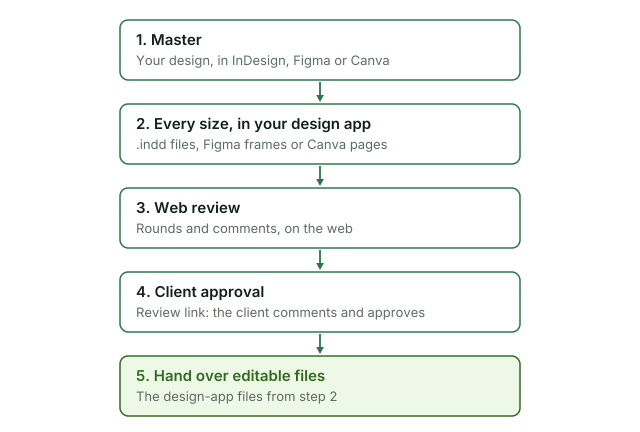
Figure 1. From master to hand-over. The editable files come from your design app.
Hand over files people can still edit
Agencies hand over work all the time: to a client’s in-house team, to a screen network, to another agency. Flat images make that hand-over a dead end. Editable files keep it open.
Mestra builds each size in the design app you used for the master: an .indd file per format from InDesign, frames in a section per brand in Figma, or pages in your Canva design. Exports such as PNG, JPG or PDF come alongside, depending on the app. If the next person needs to change something, they open the file and change it.
What stays with you
We want to be clear about this, because it matters to how agencies sell their work.
- The master is yours. Mestra lays out what’s in your master. The idea, the photography and the copy come from your team.
- Creative judgement is yours. Mestra fixes what’s clearly safe and flags anything that needs a call, such as a headline that won’t fit. Your designers decide.
- The final check is yours. A flagged format needs a person. There’s no way to dismiss a flag yet, so a person looks at every one.
What changes is where your designers’ hours go: fewer spent rebuilding sizes, more on the master and on getting each client’s work exactly right.
How Studio is priced
Studio is priced client by client, which is how agencies actually grow: A$490 per brand a month, or A$4,900 a year, with every size, motion and unlimited seats included. For example, three client brands come to A$1,470 a month, excluding GST. The pricing page has the current prices and everything else.
Sources and notes
- Brands, their rules and campaign overrides: Brands and Campaigns.
- Review links, outside reviewers and what’s kept: our Trust centre and Privacy Policy.
- Credits: the pricing page and our Terms.
- Adding your own formats: Masters, formats and runs.
- What each design app writes: Export and hand off.
- The costs described in “The real cost of resizing” are general observations, not measured figures.